

How to Choose The Best PowerPoint Background for Your Presentation
 Share
Share


 Copy Url
A great PowerPoint background can set the tone for your entire presentation. This article explores how to choose the perfect PowerPoint background and why it matters. You will learn the essentials for selecting a PowerPoint background that works for any presentation design. We also discuss the top 10 most popular PowerPoint backgrounds that can bring life to your slides. Finally, we dive into expert presentation design by Deck Sherpa, a service that can help you create professional PowerPoint presentations that truly stand out.
We start by covering the basics. You will learn what to look for when you pick themes for presentations and how to choose the right colors, fonts, and images for your slide deck design. Next, we list the top 10 PowerPoint templates that match different styles and needs. These options can help you customize your look while ensuring your content is clear and engaging. Lastly, we explain how Deck Sherpa can help you impress your audience with designs that reflect your unique message. Whether you are new to PowerPoint or a seasoned pro, this guide will provide practical tips to help you build engaging slides and deliver your message with confidence.
Essentials for Selecting a PowerPoint Background
Choosing the right PowerPoint background sets the stage for a great presentation. In this section, we discuss why your background matters, share design tips on color, contrast, and simplicity, and explain how to match your design with your audience and content. Enhance your PowerPoint slides with smart choices.
Overview
A well-chosen PowerPoint background transforms your presentation. It anchors your content and sets a professional tone. A strong background adds clarity and focus. It ensures that your message stands out without distractions. It enhances readability and creates a cohesive experience for your audience. This thoughtful choice supports your overall design and message.
Design Tips
Use complementary colors
Choose colors that enhance each other. This boosts readability and creates visual harmony.
Ensure high contrast
Make sure the text stands out from the background. This improves clarity and legibility.
Keep layouts clean with simple PowerPoint background designs
Avoid clutter and distractions. A clean layout keeps your focus on the content.
Use ample white space
Allow space between elements for a neat look. This creates balance and improves understanding.
Choose scalable images
Select images that maintain quality when resized. This ensures your design stays clear on all screens.
Limit font types
Stick to one or two fonts for consistency. This maintains a professional and uniform appearance.
Align elements consistently
Arrange text and images with care. Consistent alignment creates a balanced and organized layout.
Use subtle gradients
Add gentle color transitions for depth. This enriches the design without distracting from the content.
Apply soft textures
Introduce light textures to enhance visual interest. This adds a refined touch without overpowering the design.
Test on different screens
View your slides on various devices. This ensures your design works well everywhere.
Audience Focus
Match your background to your audience and content. Your design should reflect the tone and purpose of your presentation. Here are some examples:
- For corporate slide backgrounds in business presentations, choose a polished design.
- For creative presentation backgrounds, opt for a bold and imaginative look.
- Use professional slide backgrounds for formal meetings.
- Select simple PowerPoint background designs for clarity.
- In Microsoft PowerPoint, try a clean, minimal style with a subtle graphic and a strong visual impact.
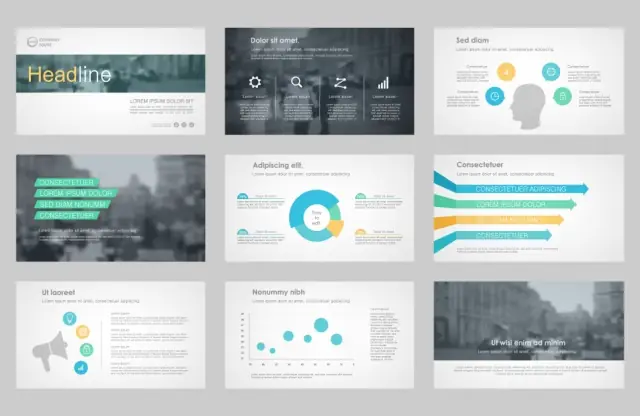
Top 10 Most Popular PowerPoint Backgrounds
Explore the top 10 most popular PowerPoint background styles in this section. We detail each style with key benefits and usage ideas to help you decide which design fits your needs best. Discover versatile options that can transform your presentation design and boost your message.
1. Minimalist
This style focuses on simplicity and clean design. It creates a calm atmosphere and avoids clutter. It features a minimalist PowerPoint background.
- Benefit: Enhances focus and clarity.
- Usage: Ideal for formal and business presentations.
2. Abstract
Abstract designs use artistic elements and irregular shapes to add creativity. They break traditional molds with unique patterns and layouts. This is known as an abstract presentation background.
- Benefit: Sparks creativity and interest.
- Usage: Best for artistic and innovative topics.
3. Gradient
Gradient styles blend two or more hues seamlessly. They offer depth and warmth, often featuring smooth gradient PowerPoint background effects with striking color gradients.
- Benefit: Adds modern depth and energy.
- Usage: Great for transitions and dynamic visual effects.
4. Corporate
Corporate designs are structured and refined. They exude professionalism with clear lines and subtle tones, serving well as a PPT background.
- Benefit: Conveys credibility and order.
- Usage: Perfect for board meetings and business presentations.
5. Modern
Modern designs embrace current trends with innovative layouts and sleek elements. They reflect a fresh look through modern slide design. For a clean look, try one of the many PowerPoint backgrounds available.
- Benefit: Offers a current, polished appearance.
- Usage: Suitable for tech and startup presentations.
6. Geometric
Geometric styles use shapes and patterns to create structure. They provide a balanced look with clear lines that enhance content organization.
- Benefit: Adds visual structure and symmetry.
- Usage: Use for data-driven and design-focused presentations.
7. Nature-Inspired
Nature-Inspired designs incorporate natural images or textures like leaves and sky. They evoke an organic and calming feel, serving as a nature-inspired slide background.
- Benefit: Brings a fresh, soothing vibe.
- Usage: Ideal for eco-friendly or wellness topics.
8. Creative
Creative styles break conventional boundaries with bold imagery and artistic flair. They stand out with a visually appealing touch.
- Benefit: Boosts engagement and energy.
- Usage: Perfect for marketing and art-related presentations.
9. Vintage
Vintage designs use classic elements and muted tones to evoke nostalgia. They merge old charm with modern clarity and work effectively.
- Benefit: Adds character and uniqueness.
- Usage: Great for historical or storytelling presentations.
10. Dynamic
Dynamic backgrounds are bold and energetic. They use movement and vibrant elements to add excitement. They encourage you to use a PowerPoint background that grabs attention.
- Benefit: Energizes the audience and livens up the slides.
- Usage: Ideal for high-energy or creative events.

Expert Presentation Design by Deck Sherpa
Using the right PowerPoint background can transform your important presentations. A carefully chosen background makes your message clear and engaging. Whether you're preparing investor decks, sales decks, marketing presentations, pharmaceutical PPTs, or medical PPTs, selecting backgrounds for PowerPoint presentations that suit your content is essential for your next presentation.
At Deck Sherpa, we help you choose and create stunning designs with ease. We guide you through a streamlined design process that offers quick turnaround and cost-effective solutions. Our expert team crafts professional and customized designs to impress your audience. For more information, visit our Showcase to see our work. Our Services page explains what we do for clients. You can also talk to our team on 1800 121 5955 (India), email us at [email protected], reach out on WhatsApp, or leave your details in the Contact form, and we'll get in touch immediately.
This guide has shown why a great PowerPoint background matters. Let Deck Sherpa bring your ideas to life with a design that stands out and supports your message every step of the way.
Related Posts
Better PowerPoint Presentation Slides for Clearer Business Communication
May 29, 2026Share
Copy Url
Professional PowerPoint Slide Design That Strengthens Your Message
Mar 24, 2026Share
Copy Url
Why Every Business Needs A Strong Credentials Deck
Jan 20, 2026Share
Copy Url